2022. 12. 12. 15:29ㆍHTML과 CSS/CSS Style
# animation
CSS에서는 animation을 이용해 역동적인 화면을 그릴 수 있다.
animation 자체로 쓰기보다는 animation의 속성과 함께 써야 효과가 있다.
가장 많이 사용되는 animation 속성 위주로 알아보자.
# animation-name
정의(Define)
animation의 이름을 임의로 지정한다.
문법(Syntax)
animation-name: [임의의 이름];
@keyframes [임의의 이름] {
from{
[적용할 CSS]
}
to{
[적용할 CSS]
}
}
예시(Sample)
See the Pen CSS animation-name by Char1ey (@char1ey95) on CodePen.
animation-name만 줘서는 별다른 효과가 나타나지 않고, @keyframe과 함께 써야한다.
다음에 나올 속성들을 추가하여야 애니메이션 다운 모션을 취할 수 있다.
# animation-duration
정의(Define)
animation의 재생 시간을 지정한다.
문법(Syntax)
animation-duration: [number] [단위];
예시(Sample)
See the Pen CSS animation-duration by Char1ey (@char1ey95) on CodePen.
# animation-iteration-count
정의(Define)
애니메이션의 반복횟수를 지정한다.
문법(Syntax)
animation-iteration-count: [number];
animation-iteration-count: infinite;
예시(Sample)
See the Pen CSS animation-iteration-count by Char1ey (@char1ey95) on CodePen.
반복횟수를 지정할 수 있으며, 숫자값을 넣으면, 숫자값만큼 움직이고, infinite라고 적으면 무한하게 움직인다.
# animation-direction
정의(Define)
애니메이션의 방향을 지정한다.
문법(Syntax)
animation-direction: normal;
animation-direction: alternate;
animation-direction: alternate-reverse;
예시(Sample)
See the Pen Untitled by Char1ey (@char1ey95) on CodePen.
- normal : 기본값;
- alternate : 종료지점 도달시 반대방향으로 이동한다.
- alternate-reverse : 시작위치를 종료지점으로 변경한다.
# animation-delay
정의(Define)
애니메이션의 딜레이 시간을 지정한다.
문법(Syntax)
animation-delay: [number] [단위];
예시(Sample)
See the Pen Untitled by Char1ey (@char1ey95) on CodePen.
# animation-timing-function
정의(Define)
애니메이션의 가속도를 지정한다.
문법(Syntax)
animation-timing-function: linear;
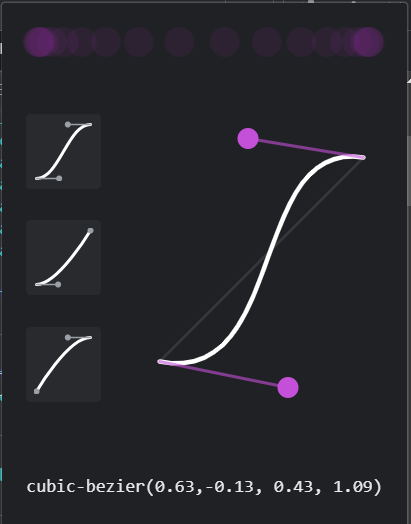
animation-timing-function: cubic-bezier(a, b, c, d);
예시(Sample)
See the Pen Untitled by Char1ey (@char1ey95) on CodePen.
See the Pen Untitled by Char1ey (@char1ey95) on CodePen.
- linear : 가속도를 0으로 하여, 일정한 속도로 유지된다.
- cubic-bezier : 가속을 세밀하게 조정할 수 있다. F12를 이용해 해당 CSS를 확인하여 조절이 가능하다.

# animation-fill-mode
정의(Define)
애니메이션 종료시의 상태를 지정한다.
문법(Syntax)
animation-fill-mode: "";
animation-fill-mode: forward;
예시(Sample)
See the Pen Untitled by Char1ey (@char1ey95) on CodePen.
- " " : 종료시의 상태를 딱히 지정해 주지 않는다.
- forwards : 애니메이션이 종료되는 지점에서 멈춘다.
'HTML과 CSS > CSS Style' 카테고리의 다른 글
| CSS transform (0) | 2022.12.12 |
|---|---|
| CSS transition (0) | 2022.12.12 |